|About|       |News|       |3D|       |Photo|       |Oddities|       |Rants|       |Reviews|       |Travel|       |Tutorials|       |Exits|

5.31.2007

Volumetric lights (a.k.a. Kinetix logo effect)

This is in fact an older tutorial, but I decided to rewrite it. I used to call it the Kinetix Logo Effect - its about volumetric lightning. With a little practice, you should be able to make cool text or logos, like these :


Let's get on with it...

Phase 1 :
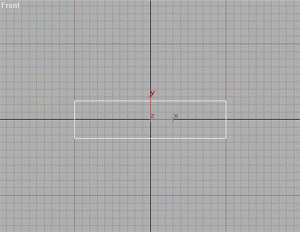
Go to (create) - (shapes), and using Keyboard Entry, create a rectangle in the FRONT viewport.
X=0, Y=0, Z=0
Width = 200
Height = 50


---------------

Phase 2 :
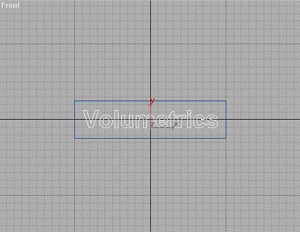
Once again go to create - shapes, and create the Text you want in the FRONT viewport. Place it in the middle of the Rectangle - this might take a little tweaking of the size of the Text-shape.


----------------

Phase 3 :
Go to (modifier), and add an Edit Spline modifier to the Rectangle.
Next up, attach the Text Shape to the rectangle by clicking - you should NOT be in sub-object mode for this operation.

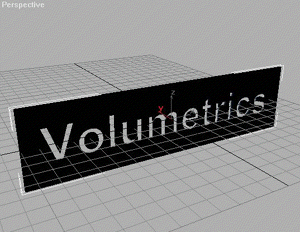
Then add a Bevel modifier (if you cant find it in the modifier list, click more)
Try these settings for starters (you can always alter them) :
Start Outline = 0,0
Level 1 :
Height = 1,0
Outline = 0,5
Check Level 2 :
Height = 1,0
Outline = 0,0
Check Level 3 :
Height = 1,0
Outline = -0,5


----------------

Phase 4 :
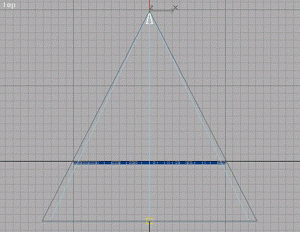
Go to (create) - (lights), and in the TOP viewport, create a Target Spot
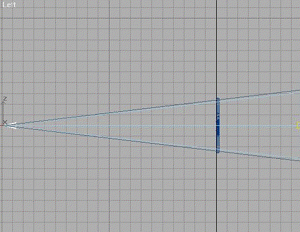
Place the spot about 200 units behind the Logo, and the Target about 80-100 in front of the Logo. Correct placement is important!
Now its time to fit the Spotlight Cone.
Select the Spot and go to , in the Target Spot rollout, go to the section with the Spotlight Parameters. Check Rectangle (instead of Circle), and by tweaking the Asp(ect) and the

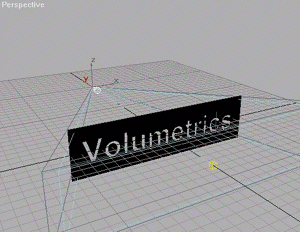
Hotspot/Falloff make the Spotlight Cone fit like here (the lightblue is the Hotspot cone, and the darkblue the Falloff cone - and the Falloff cone should be approx 3,0 units bigger than the Spotlight Cone. It takes a little tweaking, I know, but you´ll get it right)


Done? Ok...
Now to setup the rest of the Spotlight Parameters.
Color = whatever color you like.
Multiplier = 2,0

And make sure to check the Cast shadows in the Shadow Parameter Rollout.
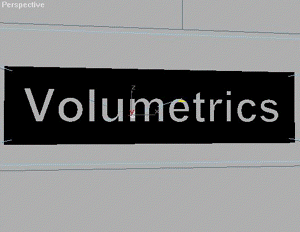
Time to set the perspective - move your PERSPECTIVE view around untill it looks a bit like the image above.

Try to get the Center of the Spotlight visible through a middle letter. You will know why when you see the rendering. Do NOT rotate the objects - use Arc Rotate, and Pan to set the perspective.

----------------

Phase 5 :
Now go to the Render menu, click Environment, and in the Atmosphere section, click Add, and select Volume Light from the list.
Click Pick Light, and select the Target Spot.
Settings for Volume Light (for now try these settings) :
Volume :
Density = 2
Check Use Attenuation Color
Check Filter Shadows : High
Sample Volume = 100% (if above options arent available, then de-check Auto)
Attenuation :
Start % = 100
End % = 80
Noise :
Check Noise On
Amount = 0,5
Check Turbulence
Size = 15
Check Wind From The : Back

- just leave the rest to its default settings.

----------------

Phase 6 :
Activate Perspective View, and hit (Quick Render). Be patient, volumetrics take a little while to render.

Looks pretty nifty, yeah?

Cyber-shoddy

Bah! I usually don't bitch much about our ISP, CyberCity, because they've been up-to-date, had competitive prices, and stable connections so far.
However, when I came back from work yesterday, we had no internet, or phone. And it never returned. Calling support only gave me a standard error-report, before disconnecting me.
And we had no net this morning either. When calling support there was no longer the standard error-report, so I assumed they had fixed the issue, but why were we not online then?
During the downtime, I obviously tried all the usual fixes, like turning the modem off and on again, and rebooting the computers. No effect at all. Internet gone, and phone gives me a line busy sound.
CyberCity has support from 9am to 8pm which is not a god damned lot, considering the price we pay. And you should at LEAST be able to bug-report your line to an automated system.
And it only got worse when I got to work this morning, and their phones were finally open. I had to wait in line a whopping 20 minutes.... with no indication of my position in the queue. I could be number 2, or number 10 billion.... That's just not good enough, CyberCity.

I may end up having to reset the router, and with it I'll loose all my settings. Which is rather annoying, because setting up the new router was not as easy as with the old one.

Add to that the fact, that our connection speed is not yet up to the promised 20Mbit (rather about 14-15Mbit), I'm not too happy with CyberCity these days.

It's so much worse to suddenly be without something that's an important part of your daily activities, than to never have had any use for it in the first place. Just imagine a pizza parlor, suddenly with no dough...

- pooh sounds in CyberCity's direction....

*edit* Oh horror and suffering! I've just returned from work, had CyberCity support on the phone, and we were unable to fix the issue with the connection. What's even worse is, they might not be able to send a technician tomorrow - which means we'll have to wait untill monday.
This is so NOT cool. The sun had better be friggin shining during the weekend.... even during the night!

- at least my 3G phone's built-in modem will allow me some sort of connection to the internet. And it's actually not that bad. But it is probably extremely espensive...

Oh what sad, medieval times are these that have been forced upon us....

*edit 2*
It appears that CyberCity are themselves to blame for the disconnection. I spoke to the girl in the flat beneath us, who is a CC customer as well, and apparently she had a technician come fix something - wednesday - at noon. Oh he fixed something all right. This is consistent with the fact that we had internet up to 8.45 am wednesday, where me and Liv left for work, but when I got back at 5.30 pm, there was nothing.
So I intend to get a refund for the 5 days in total we'll have been without net and phone, which comes to about 1/6 of the monthly fee. And they'd better friggin pay up!

*edit 3*
Ok we should be up and running again. The techie called me around 11am, and said that the line had been broken (duh!), but he had tracked it from the central and to our building and fixed it. He also told me that CyberCity now had contact to my router again. I can't check untill I get back home, but hopefully I'll be able to post something with images again tonight.
- now all I need to do, is figure out how much I'll have to pay for the data transfers, using my mobile as modem during the downtime... *sigh*

5.30.2007

3D Santa game (completely off season)


In november 2006, I started working on the annual Christmas greeting card from TurnTool. Since TurnTool is a 3D web-viewer plugin, It has to be something 3D (and interactive). And obviously they have to out-do last years card.
So we came up with a Santa collector game.
I worked for 3 weeks or so, together with Johannes from TurnTool, who was the main scripter. All models, level design, and textures are by me (except the angry bear which I had Rasmus Jensen do).


The setup is pretty classic :
In his rush, Santa has dropped several of the presents scheduled for the christmas delivery, over the fields of Norway. And now he has to pick them up again.


So you take control over Santa on a sleigh, and race downhill, through ski huts, fire loops, hollow tree trunks, mountains, forrests - picking up presents while avoiding, angry bears, egg nog (which messes up your steering), cracks in the ice etc.
A few power-ups are good though. There's both a time bonus, and a vacuum cleaner, which attaches to your sleigh, and sucks in the presents from a greater distance. It will also suck in the egg nog, so be carefull. Going through a fire loop, will also boost your speed for a while.


Try it out by clicking either of the images to the left.
Obviously the game uses the TurnTool plugin - so if you don't have it installed, you will be prompted to do so.

TurnTool interactive scenes unfortunately only works with 32 bit version of Internet Explorer, and to my knowledge, none of the newer versions of Firefox or Chrome.

5.28.2007

Happy Birthday bro'

Just back from Anni and Harry's (that's my brother's girlfriend's parents), where he had his birthday party thingy. And we brought a present of course :

- it's a rubber chicken, stuffed with 100,- danish crowns in 1-crowns. A little something to shop for, on his and Tine's trip to London next week :)


This is the hero of the day - unwrapping the chicken, and trying to shake out the money. However, they don't come out that easy.

Click image for video* ->


During the afternoon, alcohol was introduced, and funny games emerged - Flip Flower.
Having constructed a rather complex set of goals, using straws and glasses, Thomas and Sune started flipping decorative flower gems across the room, to much amusement for everyone... except perhaps those that got hit repeatedly (that'd be Tine, judging from the audio).

Click image above for video* of the first trial run.


If it looks stupid, then it's because it was. But it was rather funny.
The main object with the game, was to flip other flower gems through the goals, and into the glasses. And you'd win some rather tacky plastic diamonds. Yes, I know, It makes absolutely no sense, but it doesn't have to :)

Click image above for video* of the final heat.
(* all videos require Divx6)

All in all a funfilled and enjoyable afternoon in good company with family and friends, so a big thanks to the hosts, and the guests - and have a nice trip to London, guys.

5.27.2007

Detachable mustache

I don't know how old this "trend" is, but i'ts hilarious. Is it only me who don't see the finger at all, but just the mustache?


French tickler for guys...


Unisex tickler...


Looks great on kittens too...

(images courtesy of third party - if they are yours, and you don't want them here, let me know)

Tutorial, schmuschmorial...

I've (re)uploaded a tutorial for 3dsmax, and since there's now more than one tutorial I've also made a tutorial index.

Hatetank.dk has gotten a new facade as well, and I'll slowly start removing anything else but the tutorials, in respect of the many sites linking to them. But they'll also be hosted here eventually.
It's the perfect opportunity to clean up stuff. So I am. Cleaning up stuff...
Hatetank.dk will instead serve as my portfolio dumpsite, so if you just wan't to see graphics, that's probably the most direct way. And it will most likely have stuff I won't put online here.

I'm going to Hinnerup later today, for some Whitsunday relaxation at the inlaws, and tomorrow it's my kid brother's birthday (well, it's not tomorrow, but he'll be in London on the day). Boy do I have the best present for him ever. I'll reveal it here tomorrow. Aren't you exited?

5.24.2007

Seed Interactive Content

I've decided to upload various bits and pieces from Seed, but this time with a twist.
I'm gonna use TurnTool to publish interactive 3D content. Meaning you get to view them in 3D - zoom, pan, turn it around, and maybe more if I get the time.

TurnTool is a nifty little plugin. It's 100% safe, and it is only about 5-600kb download or so.

First in the series of S.I.C. (hahaha) is the FloatBed and the FloatBed Handler (internally known as Mecha Toddler, and Mama Bear). I believe this is relatively unknown to anyone else but the former Seed crew.

Click the image to open a new window with the 3D content. Enjoy.
Approx. data amount to download : 990Kb

FloatBed and Handler models are my doings. Textures made by Jan Roed and Rasmus Jensen.


Another one.
Lab Station with two attachments - a medic bay, and a plantation pod. Lab Station by me, attachments by Thomas "morfar" Kofoed, and textures by the RGD texture department.

Click the image to open a new window with the 3D content. Enjoy.
Approx. data amount to download : 1200Kb


One more :
A SharePoint. Scattered throughout the tower, it was the source for resources, blueprints, tools and many other items. Also to the place to recycle or repair your damaged goods.

SharePoint by me, and textures I think was done by Jan.

Click the image to open a new window with the 3D content. Enjoy.

Approx. data amount to download : 350Kb


Been tweaking most of the afternoon on this :
Steam Baths.
Since I'm converting from one engine setup to another, it does take some time to prep textures, collisions, camera, physics, and so on and so forth.
But it is doable, and I've managed to squeeze the data down to 15Mb.

Controls are pretty standard FPS mode, but the floors are kinda slippery...

Approx. data amount to download : 15 Megabyte*

Modelling 98% by me, and textures by the RGD texture crew.
Once again : Click the image to open a new window with the 3D content. Enjoy.

(*) most of it is textures though, and it will load the geometry and fog first, and you should be able to walk around while it loads the textures one by one.


More of the lovely Seed Architecture - a Radlock.
Used to travel (read loading) between locations within the tower. Sterilizing bacteria and other nasty microbes, ensuring a clean *cough* environment.

Radlock by me, and textures by the texture crew.

Click the image to open a new window with the 3D content. Enjoy.

Approx. data amount to download : 1200Kb


I'll start putting some Seed tools online. First up - the Bolt Cutter. Not sure if it ever made it into the game or not.
Model by me, texture by Anders (I think).

Approx. data amount to download : 100Kb


Heavy duty welding laser MK2. Also not sure if this one made it into the game. We did have an older welding laser - I'll see if I can dig it up.

I think this one was all by Anders.

Approx. data amount to download : 100Kb


... and there it is. The first version of the HDW Laser.

I like how it shows, that we got better at texturing stuff. Look at the shadow work on the HDW Laser Mk2, and compare it to the total lack of shadows on Mk1.

This model by me, texture by the texture guys.

Approx. data amount to download : 220Kb


One of the HUB variations that never made it into the game, but were ready to implement. Following the event of "Esme's Tree", we decided it would be a good idea to have more content ready to implement/replace in the game world, should the stories and events call for it.
There are about 5-6 different HUB's, including Esme's tree.
I'll try to get them all online.

Approx. data amount to download : 1120Kb


TurnTool interactive scenes unfortunately only works with 32 bit version of Internet Explorer, and to my knowledge, none of the newer versions of Firefox or Chrome.